A1
fx
=STOP_GUESSING(taxes)
// FOR FREELANCERS, SOLOPRENEURS & 1099 CONTRACTORS
The spreadsheet that knows your tax number.
Log income. Log expenses. Stashly does the quarterly math and tells you exactly what to park for the IRS — in one .xlsx file you own forever.
NO SUBSCRIPTION
EXCEL + SHEETS
30-DAY GUARANTEE
TAX YEAR 2026
A · client
B · amount
C · status
1
Acme Studio
$3,200
● paid
2
Norton & Co consulting
$5,400
● paid
3
Brand refresh — Kira
$2,750
○ unpaid
4
Retainer — June
$3,000
● paid
5
SET ASIDE THIS QUARTER →
$4,206
Dashboard
Income
Expenses
Tax Set-Aside
+
=HOW_IT_WORKS(3_steps)
No accounting know-how. No setup call. About five minutes a week.
1
Add income & expenses
Type or paste your numbers. Built-in dropdowns sort everything into the right buckets for you.
2
See what to set aside
Stashly instantly shows the dollar amount to set aside — split by quarter, with the IRS due dates.
3
Move it to savings
Park that amount each time you get paid. That's it — April becomes a non-event.
EXAMPLE
You invoice $8,000, log $1,200 in expenses, set your rate to 30% → Stashly says set aside about $2,040 this quarter, and about $4,760 is safe to pay yourself.
=SET_ASIDE(your_invoice, rate)
Drag the sliders. This is what Stashly does for you, all year. (An estimate — not tax advice.)
B2 · IF YOU INVOICE
$8,000
C2 · RATE 30%
D2 · SET ASIDE FOR TAXES
$2,400
Park it in savings each time you get paid.
E2 · SAFE TO PAY YOURSELF
$5,600
Spend it without April guilt.
=EVERYTHING(you_need, one_file)
Seven connected tabs that do the math for you.
B2
Auto tax set-aside
The recommended amount by quarter, with U.S. estimated-tax due dates built in.
C2
Live dashboard
Income, expenses, profit, outstanding invoices and "safe to pay yourself" — updated instantly.
D2
Income & expense logs
Dropdowns, paid/unpaid status and deductible flags. Totals add themselves up.
B3
Invoice tracker
See exactly what you've billed and what's still outstanding, at a glance.
C3
Excel & Google Sheets
Open it however you like. Every formula works the same in both.
D3
Yours forever
One file you own. No subscription, no login — nothing ever leaves your computer.
=LOOK_INSIDE(the_tabs)
The tabs you'll actually use. Every formula and chart works the same in Excel and Google Sheets.
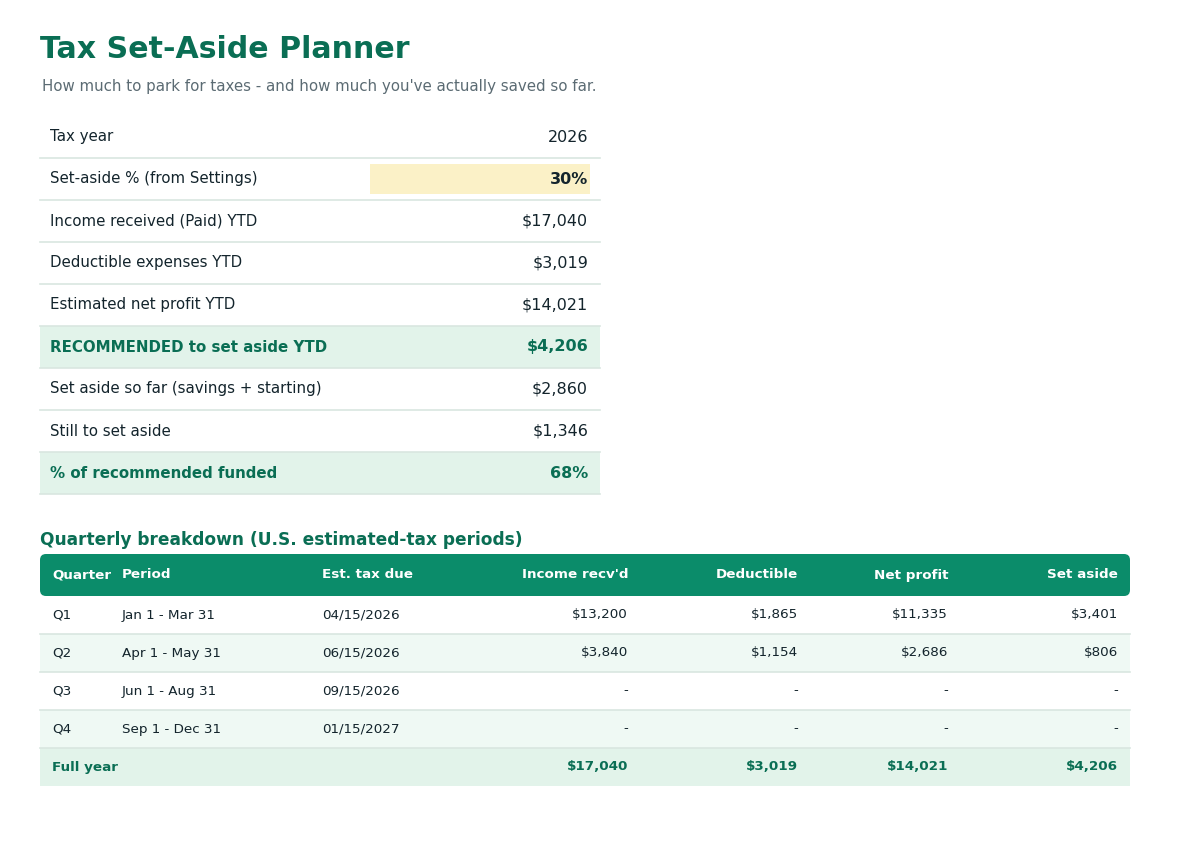
↳ Tax Set-Aside — the amount to park for each quarterly IRS deadline
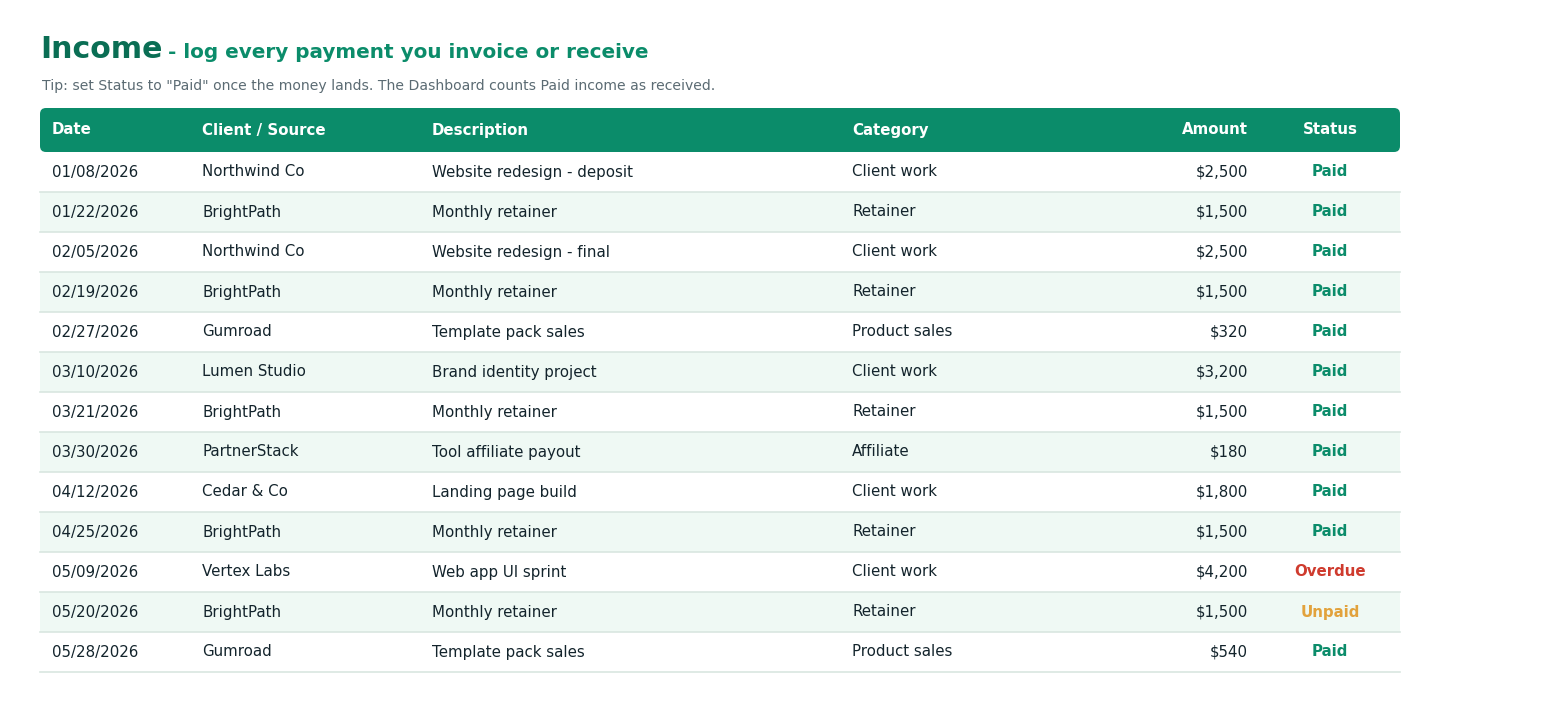
↳ Income & Expense Logs — every payment, paid/unpaid, categorized
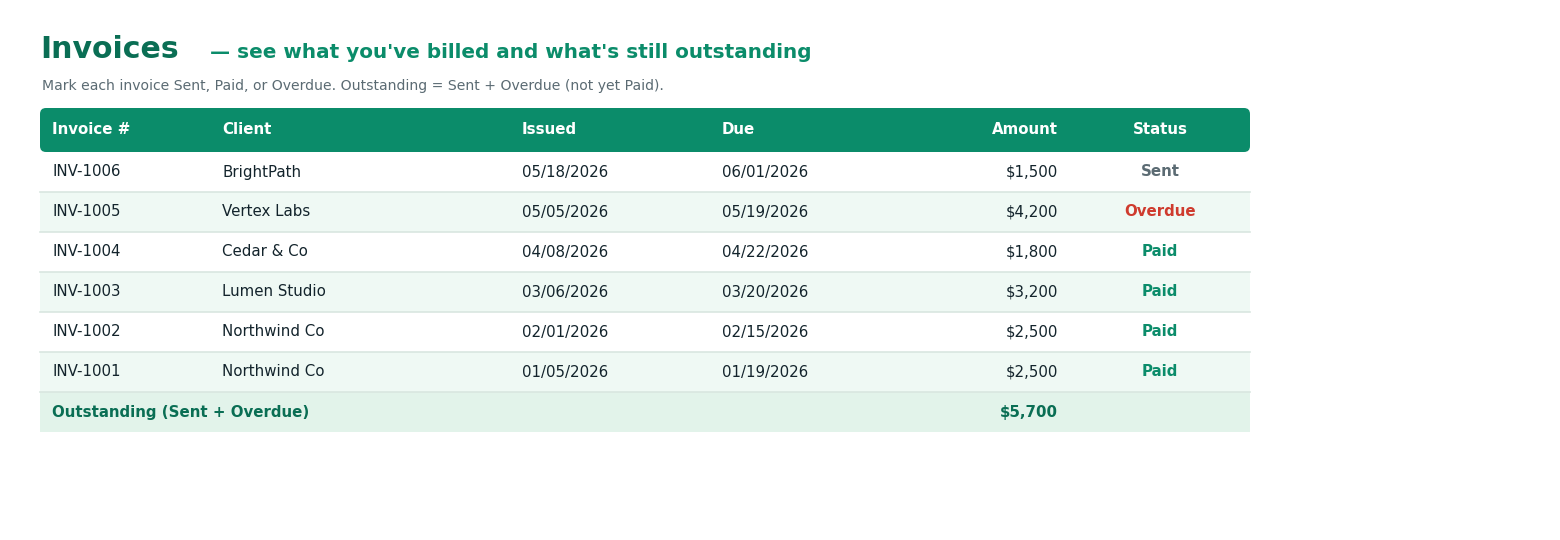
↳ Invoice Tracker — what you've billed, what's outstanding
=IF(freelancer, TRUE, FALSE)
✓ TRUE — great for you
Freelancers, solopreneurs, creators, consultants, side-hustlers and 1099 contractors who want to know what to set aside — and what's safe to pay themselves — without accounting software.
✗ FALSE — not built for
Payroll, inventory, sales tax, multi-state filing, or actually filing your return. Stashly plans your tax set-aside — it's not a CPA or a filing service.
One file.
One price.
Yours for good.
Founding-customer pricing — the lowest Stashly will ever be. Pay once, own it forever, free updates included.
🛡️ 30-day no-questions money-back guarantee
STASHLY.XLSX — ONE-TIME$14
✓The complete Stashly workbook (7 tabs)
✓Auto tax set-aside + quarterly planner
✓Live dashboard & monthly chart
✓Income, expense & invoice trackers
✓Works in Excel and Google Sheets
✓Free updates, forever
✓Step-by-step user guide (PDF) included
GET STASHLY NOW →
=FAQ(good_to_know)
Q: Excel or Google Sheets?
Both. It's an .xlsx file — open it in Excel, or in Google Sheets choose File → Import → Upload. Every formula works in either.
Q: Do I need to know accounting?
No. If you can type a number into a cell and pick from a dropdown, you can run Stashly. The math is already built in.
Q: Is this tax advice?
No. Stashly estimates what to set aside based on a rate you choose. It is not a CPA — confirm your actual obligations with a tax professional.
Q: How much should I set aside?
A common rule of thumb is 25–30% of net profit. The Settings tab includes a built-in "how to pick your %" guide.
Q: What if it's not for me?
Email within 30 days and you get a full refund. No questions.
Q: Any ongoing fees?
None. You pay once and own the file. No subscription, no account, nothing leaves your computer.
Q: Is my financial data private?
Completely. Stashly lives on your computer or your own Google Drive. No account, no login — nothing is ever uploaded to us.
Q: Can I reuse it every year?
Yes. Set the tax year in Settings and keep going, or duplicate the file for a clean slate. Free updates included.
Q: I'm outside the U.S. — can I use it?
Tracking works anywhere. The quarterly due dates and 30% default are U.S.-oriented, but you can set your own rate.
Q: Where should I keep my tax money?
In a separate savings account — ideally high-yield — and move your set-aside % there every time you get paid.
=IF(freelancer, get_stashly, panic_in_april)
Five minutes a week now. Zero panic in April.
GET STASHLY NOW →S
Stashly
© 2026
Questions? hello@getstashly.com
Free tax calculator
How to use Stashly
How much to set aside
Quarterly taxes
Deductions
Best tax spreadsheet
QuickBooks alternative
Track 1099 income
Disclaimer: Stashly is a self-help planning tool, not a CPA, accountant, or tax advisor, and does not provide tax, legal, or financial advice. All tax figures are estimates based on a set-aside percentage you choose and may not reflect your actual liability. Always confirm with a qualified tax professional. Sold as a single-user license; redistribution or resale is not permitted.